Language support
The plugin integrates Python, Kotlin, Java, JavaScript/TypeScript, their frameworks (React, Angular, Vue), and CSS/LESS/SCSS/SASS, Go, PHP, Ruby.
We value your feedback
Share your experience and suggestions with us on YouTrack .
Get started in moments
After installation, the plugin immediately enables you to enjoy enriched inline suggestions for code completion:
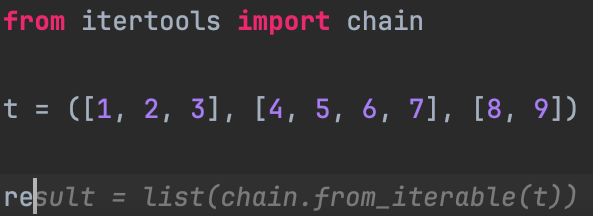
Accept suggestions with the Tab key. Customize the shortcut to your preferences via the hover menu over the gray text.
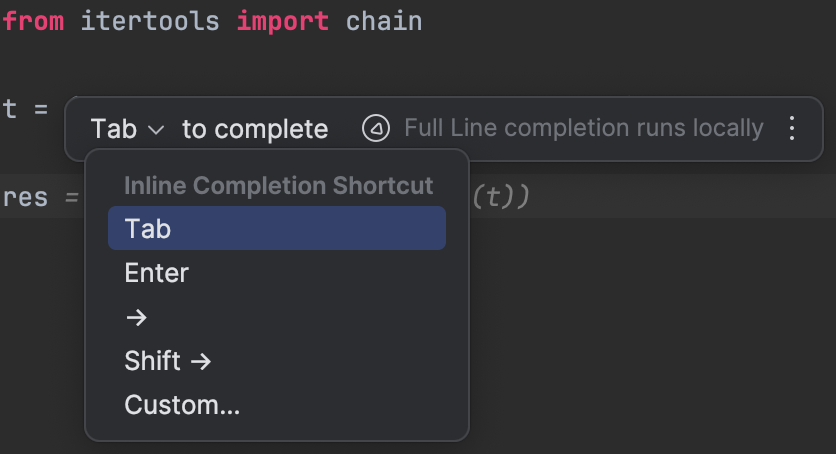
Customize your settings
Navigate to Preferences | Editor | General | Code Completion | Full Line Code Completion to adjust your settings.
FAQ
- Do you send my private data or code over the internet?
- We prioritize the privacy of your data. The Full Line Code Completion plugin works on your local device, ensuring no data is sent over the internet.
- What are the plans for supporting additional languages?
- The 2024.2 plan is to add support for C++, C#, and Rust.
- What are the hardware requirements for the plugin?
- It is fully compatible with Linux, Mac, and Windows operating systems and takes less than 200 MB of disk space. Our model is executed entirely on the CPU with the ability to run on GPU on Macs, automatically adapting to your device's capabilities to ensure seamless operation.
- We prioritize the privacy of your data. The Full Line Code Completion plugin works on your local device, ensuring no data is sent over the internet.
- What are the plans for supporting additional languages?
- The 2024.2 plan is to add support for C++, C#, and Rust.
- What are the hardware requirements for the plugin?
- It is fully compatible with Linux, Mac, and Windows operating systems and takes less than 200 MB of disk space. Our model is executed entirely on the CPU with the ability to run on GPU on Macs, automatically adapting to your device's capabilities to ensure seamless operation.
]]>